 Farol
Claude Code and Codex run in a terminal, so any terminal works. One agent in one tab is fine. The trouble starts at three or four: which one is waiting for you, which one is still working, and which one just changed the file another is editing?
That's the job a terminal for coding agents has to do. I build one of the options below, Farol, so take my pick with a grain of salt. I've tried to be fair to the others and linked their own pages for every claim.
What an agent terminal needs
- A session per agent, with its status. Working, waiting for you, or done, visible without clicking through tabs.
- Isolation. Two agents on the same folder overwrite each other. A git worktree per task gives each one its own copy of the repo on its own branch.
- A way to know it's waiting. A notification, a badge, ideally your phone. An agent that waits ten minutes for a yes is ten minutes lost.
- Review before shipping. You read every diff an agent writes. The closer the diff is to the terminal, the more you actually read it.
- Speed. Agents print a lot. A terminal that stutters with ten sessions open gets in the way of all of the above.
At a glance
| What it is | Runs on | License | Worktree per task | Phone | |
|---|---|---|---|---|---|
| Farol | Native terminal for agents, on libghostty | macOS, Apple silicon | MIT | Built in | Free iPhone app, beta |
| Paradev | Agent workspace app, on Electron | macOS, Linux (experimental) | Elastic License 2.0 | Built in | iPhone and iPad, on Pro |
| Conductor | Mac app for parallel agents | macOS | Not stated | Isolated workspaces | Not mentioned |
| cmux | Native terminal for agents, on libghostty | macOS, Apple silicon or Intel | GPL-3.0 | Not mentioned | iOS app, beta, on Pro |
| Warp | Agent platform with its own terminal and agent | macOS, Linux, Windows | Terminal open source | Not mentioned | Not mentioned |
| Ghostty, iTerm2 | Fast general terminals | macOS (Ghostty on Linux too) | MIT, GPL-2.0 | By hand | No |
Farol
Farol is a native macOS terminal made for running several agents at once. It's built on libghostty, the engine behind Ghostty, and reads your Ghostty config.
Press ⇧⌘N, describe a task and pick Claude Code, Codex, OpenCode or Pi. Farol creates a worktree on a new branch and starts the agent there with the task as its first prompt. A task can also start from a Jira ticket or a GitHub issue, or wait to run later, once or on the days you pick. The sidebar shows every session with a dot that says working, waiting or done, and the menu bar or the notch shows the same from any app.
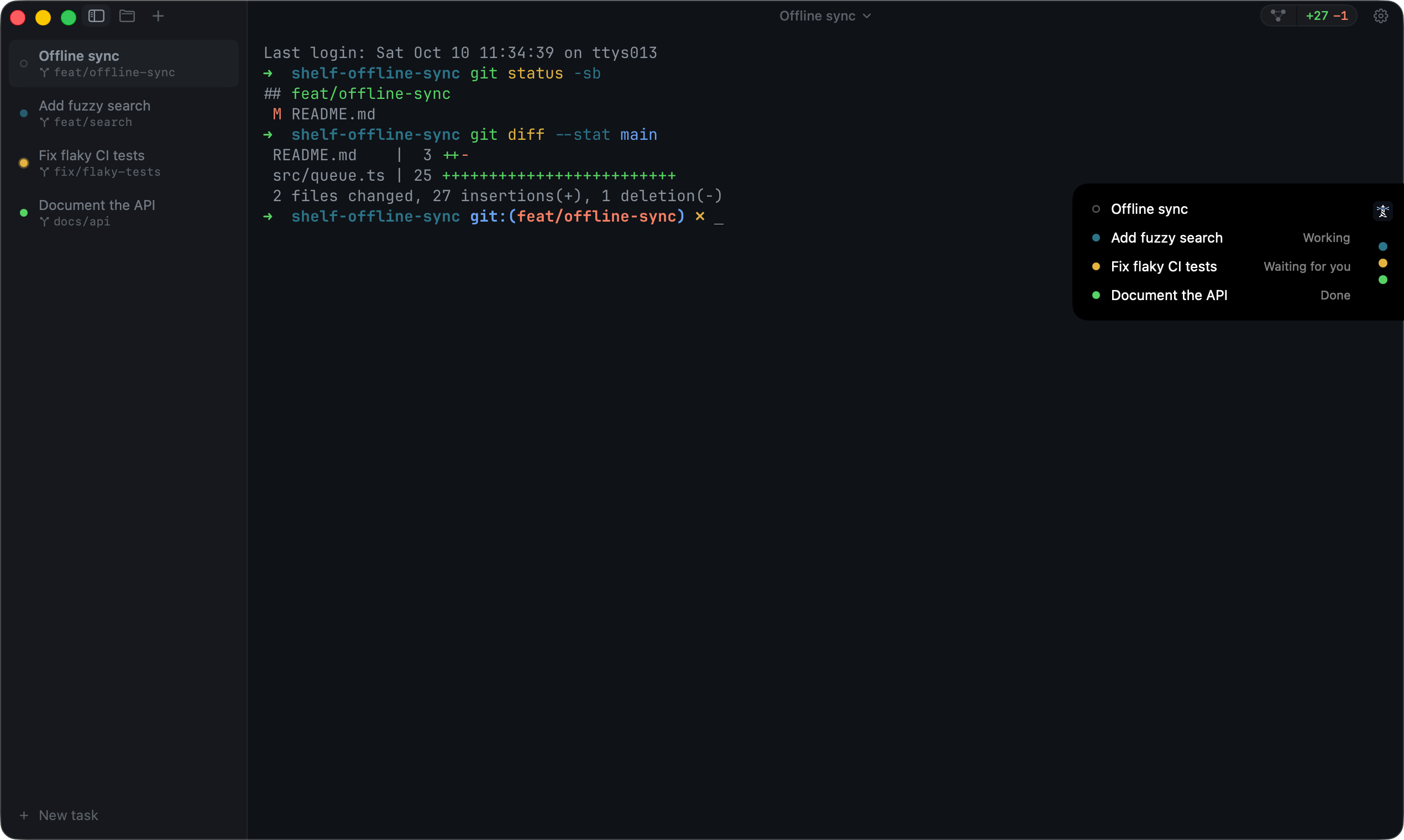
When an agent is done, the review panel shows its changes as one diff. You leave notes on lines for the agent, or commit, push and open a pull request from there. There's a git graph and a three-column conflict resolver too. Agents on a server you reach over ssh show in the same sidebar, next to your own. And Farol for iPhone lets you answer an agent from your phone, end-to-end encrypted.
Paradev (formerly Superset)
Paradev, called Superset until its rename, is the most complete app here. Each task gets a worktree, a branch and terminals. It has a diff viewer, a browser for previewing your app, automations that start agents on a schedule or an event, remote access to another machine, cloud workspaces, and integrations with Slack and Linear. It's built on Electron.
The desktop app is free for local workspaces. Remote access, automations, Linear, Slack and the mobile app are on Pro, at $20 a month per user, and cloud workspaces start with Team. Its code is public under the Elastic License 2.0, which isn't an open source license.
Conductor
Conductor is a Mac app for running Claude Code, Codex and Cursor agents in parallel, each in an isolated workspace, then reviewing and merging their work. It's built around that workflow more than around a terminal.
cmux
cmux is the closest to Farol in spirit: a native macOS terminal on libghostty, with vertical tabs, notification rings when an agent needs you, and a browser you can split next to the terminal and script. It has a diff viewer and can link a workspace to its pull request. Its README calls it "a primitive, not a solution". It's GPL-3.0, and its iOS app, in beta, comes with the $50 a month Pro plan.
Warp
Warp now describes itself as an agentic development platform. It has its own terminal, which it says is open source, its own coding agent, and it works with Claude Code and Codex too. It runs on macOS, Linux and Windows, and its agent runs are priced by usage.
Ghostty or iTerm2, with tmux
The classic setup: a great terminal, tmux for sessions, and git worktree add by hand for each agent. Ghostty is fast and native, iTerm2 is mature and does everything. Neither knows what an agent is, so status, notifications and review are up to you, through hooks and scripts.
How to choose
- You're on a Mac and want everything built in, free: Farol.
- You need a Linux desktop app or cloud workspaces: Paradev.
- You want a fast terminal with notifications and will script the rest: cmux, or Ghostty with tmux.
- You need Windows: Warp.
Whichever you pick, use a worktree per agent. It's the one habit that makes running agents in parallel work at all. I wrote how to set that up by hand.
Sources
- paradev.com, its pricing and its GitHub
- conductor.build
- manaflow-ai/cmux on GitHub
- warp.dev
- ghostty.org and iterm2.com
All checked on October 27, 2026. Farol's and cmux's sections updated on November 7. Spotted something out of date? Open an issue.