 Farol
Farol vs Paradev (formerly Superset)
Farol and Paradev do the same job. You run several coding agents at once, like Claude Code and Codex, each in its own git worktree, and you review what they did before it ships. Paradev was called Superset until its rename, and its CLI is still named superset.
I make Farol, so weigh what follows with that in mind. Every claim about Paradev links to its own site or docs, and the page says where Paradev is the better choice.
The short version
- Pick Farol if you want a fast native Mac terminal, an open source license, and a phone app that costs nothing.
- Pick Paradev if you need Linux or an Intel Mac, agents that start on an event, cloud workspaces, or Slack and Linear built in.
Side by side
| Farol | Paradev | |
|---|---|---|
| App | Native macOS app on libghostty, the engine behind Ghostty | Electron and React |
| License | MIT, open source | Elastic License 2.0, source available |
| Price | Free | Free for local workspaces. Pro is $20 a month per user, $16 billed yearly |
| Platforms | macOS 14+, Apple silicon | macOS on Apple silicon or Intel. Linux in an experimental AppImage |
| Agents | Claude Code, Codex, OpenCode and Pi in one click. Any other through farol status | Any CLI agent. Claude Code and Codex detected on first launch |
| Worktree per task | Yes, also one task across several repos | Yes |
| Review | One scrolling diff, commit, push, open a PR on GitHub or MR on GitLab | Diff viewer with comments and edits, then commit and push |
| Merge conflicts | Three-column resolver | Not advertised |
| Tasks from tickets | Jira and GitHub issues | Linear, on Pro |
| Phone | Free iPhone app, end-to-end encrypted. In beta on TestFlight | iPhone and iPad app on the App Store, on Pro |
| Agents on another machine | Servers in the sidebar, set up over ssh with farol-host | Remote access to another machine, on Pro |
| Scheduled agents | Tasks for later, once or on the days you pick | Automations, on Pro |
| Cloud workspaces | No | Yes, from the Team plan |
| Built-in browser | No. Ports open in your browser | Yes |
| Scripting | farol CLI: sessions, tasks, wait, read and send | CLI, TypeScript SDK and MCP server |
Where Farol is ahead
A native terminal, not a web view
Farol is a Swift app built on libghostty, the same engine as Ghostty. It reads your Ghostty config and themes. Sessions you aren't looking at keep running but stop drawing, so twenty agents in the background cost no GPU time. Paradev is built on Electron.
Open source, and free all the way
Farol is MIT licensed. Paradev's code is public under the Elastic License 2.0, which its own site says is not an approved open source license. Paradev's desktop app is free, and remote access, automations and its mobile app need Pro. Farol has no paid plan.
The phone app costs nothing
Farol for iPhone lists your sessions, notifies you when an agent waits, and lets you answer Claude Code or Codex with a tap. Messages go through a relay that can't read them. It also works with agents on a server of your own. How the encryption works.
More of git in one window
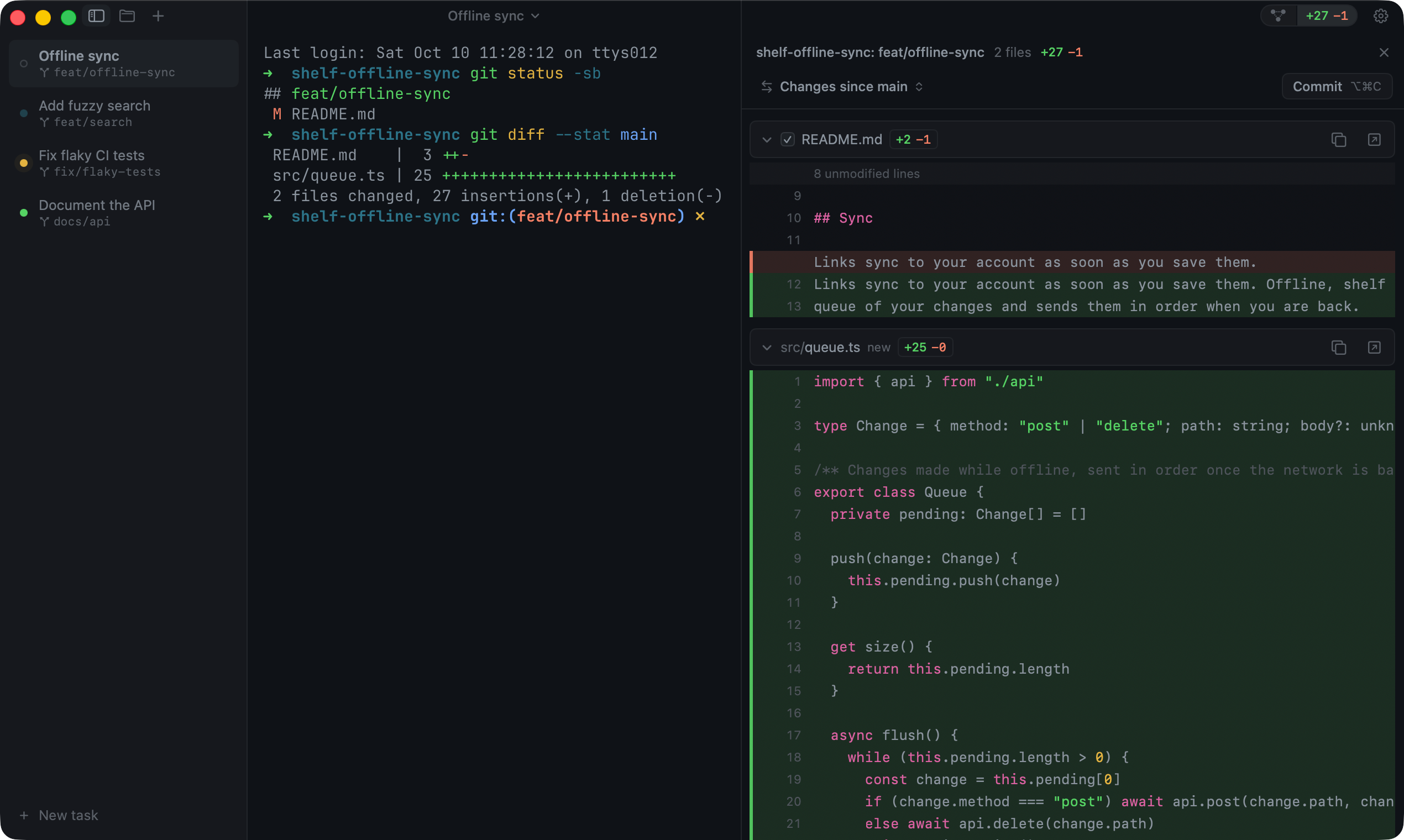
Besides the review panel, Farol has a git graph where you check out, rebase or cherry-pick, and a three-column resolver when a merge or rebase stops on conflicts. A New task can start from a Jira ticket or a GitHub issue, and one task can span several repos, each in its own worktree on the same branch.
Status from any app
A lighthouse in the menu bar, or a small panel at the notch, shows which agents work, wait or are done while you're in another app.
Where Paradev is ahead
- More platforms. Intel Macs, and Linux in an experimental build. Farol needs Apple silicon.
- Automations on events. Agents that start when something happens, like a new issue to triage. Farol's tasks for later start at a time, not on an event.
- Cloud workspaces, so nothing has to run on your machine. Farol keeps everything on your Mac or your own server.
- A browser inside the app, and integrations with Slack and Linear.
- An SDK and an MCP server, and a larger team and community behind it.
Which one to pick
If you live in the terminal on a Mac and care about speed, an open license and answering agents from your phone without a subscription, try Farol. If your team needs Linux, cloud workspaces or agents that start on events, Paradev covers more of that today.
You don't have to choose blind. Both are free to try, and both work with the agents you already pay for.
Moving from Paradev to Farol
Install Farol from the download or with Homebrew:
brew install --cask snowztech/tap/farol- Connect Claude Code and Codex in Settings → Agents, one click each.
- Press ⇧⌘N, describe the task and pick an agent. Farol creates the worktree and starts the agent on it.
- Worktrees you already have are plain git worktrees. Open their folders as sessions and carry on.
- To answer from your phone, turn on Remote in Settings and scan the code with Farol for iPhone.
Questions
Is Paradev the same as Superset?
Yes. Paradev is the new name for Superset. Its CLI is still called superset, and its Homebrew formula is paradevai/tap/superset. It isn't related to Apache Superset, the data dashboard tool.
Is Farol open source?
Yes, under the MIT license. The source is on GitHub.
Does Farol need an account?
No. Farol runs on your Mac and talks to GitHub, GitLab and Jira through the tools you already use, like gh. Nothing goes through a Farol service, except Remote's relay, which can't read the messages it passes.
Does Farol run on Linux, Windows or an Intel Mac?
No. Farol is a native app for Apple silicon Macs on macOS 14 or later. Agents can run on a Linux server with farol-host, and you reach them from your phone.
Can I use Claude Code and Codex at the same time?
Yes, in both apps. In Farol, each task picks its agent, and the sidebar shows which one is working, waiting or done.
Sources
- paradev.com: features, platforms, license and supported agents
- Paradev pricing: what Free, Pro and Team include
- paradevai/paradev on GitHub: the stack (Electron, React), the license and the Superset name
- Paradev install docs: system requirements
- Paradev setup and teardown scripts
- Farol on GitHub: features, roadmap and changelog
Something here out of date or wrong? Open an issue and I'll fix it.