 Farol
Farol and cmux are close cousins. Both are native macOS apps built on libghostty, the engine behind Ghostty, both read your Ghostty config, both are open source, and both are made for running Claude Code, Codex and other agents side by side.
Where they split is how much they do for you. cmux's README calls it "a primitive, not a solution": a fast terminal with notifications, a scriptable browser and an API, and you build the workflow. Farol builds the workflow in: a worktree per task, review, pull requests and a phone app.
I make Farol, so weigh what follows with that in mind. Every claim about cmux links to its own site or README, and the page says where cmux is the better choice.
The short version
- Pick Farol if you want each agent in its own worktree, its diff reviewed and sent back as notes, and a pull request opened, all in one window, plus a phone app that costs nothing.
- Pick cmux if you're on an Intel Mac, want a browser next to your terminal that agents can drive, or like building your own workflow on a CLI and socket API.
Side by side
| Farol | cmux | |
|---|---|---|
| App | Native Swift app on libghostty | Native Swift and AppKit app on libghostty |
| License | MIT | GPL |
| Price | Free | Free app. Pro, $50 a month, adds the iOS app and cloud VMs |
| Platforms | macOS 14+, Apple silicon | macOS 14+, Apple silicon or Intel |
| Agents | Claude Code, Codex, OpenCode and Pi in one click. Any other through farol status | Any CLI agent. Names Claude Code, Codex, OpenCode, Gemini CLI, Aider, Amp and more |
| Agent status | A dot per session: working, waiting or done. Menu bar and notch too | A blue ring on the pane and a lit tab when an agent needs you |
| Worktree per task | Yes, also one task across several repos | Not described in its docs |
| Review | One scrolling diff, notes sent back to the agent, commit, push, open a PR | A diff viewer. Links a workspace to a PR |
| Git | Git graph and a three-column conflict resolver | Branch and PR status in the sidebar |
| Tasks from tickets | Jira and GitHub issues | Not described |
| Tasks for later | Once at a set time, or on the days you pick | Not described |
| Phone | Free iPhone app, end-to-end encrypted. In beta on TestFlight | iOS app in beta on TestFlight, on Pro |
| Remote machines | Servers in the sidebar, set up over ssh | cmux ssh workspaces, remote tmux in beta |
| Built-in browser | No. Ports open in your browser | Yes, scriptable by agents |
| Scripting | farol CLI: sessions, tasks, wait, read and send | cmux CLI and a Unix socket |
Where Farol is ahead
A worktree per task, built in
Press ⇧⌘N, describe the task and pick an agent. Farol fetches the default branch, creates a worktree on a new branch and starts the agent there. A committed .farol/setup prepares each new worktree, and a task can span several repos. In cmux, as in any terminal, you'd run git worktree add yourself. I wrote up how that works by hand.
Review that talks back to the agent
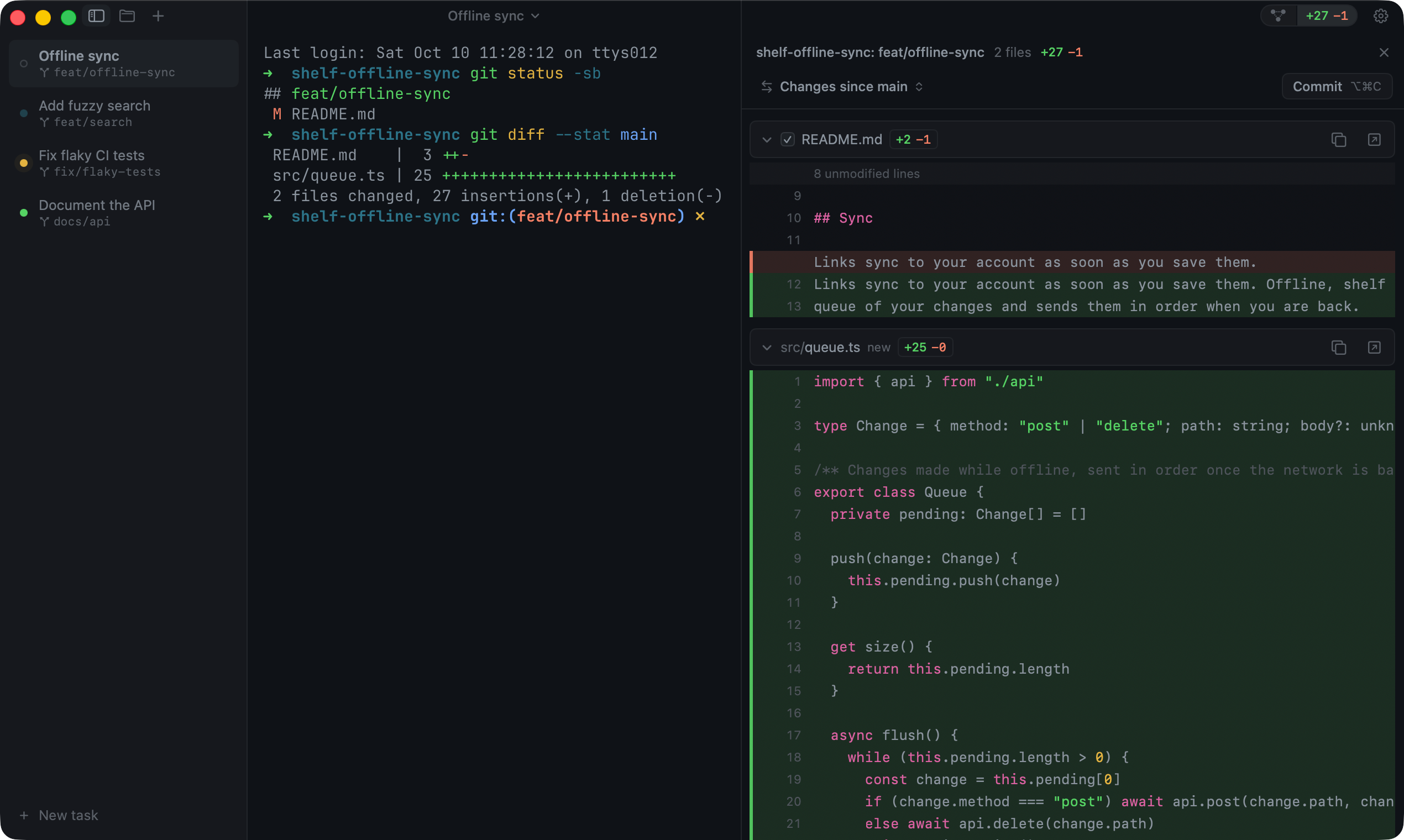
When an agent is done, the review panel shows its changes as one diff. Leave notes on lines and send them all to the agent in one message, or commit, push and open the pull request from there. A git graph and a three-column conflict resolver sit next to it. cmux has a diff viewer and shows a workspace's linked PR, but its site doesn't describe opening a PR from the app.
Tasks that start themselves
A task can wait for later: once at a set time, or again on the days you pick, each run in a fresh worktree. Each one is a Markdown file in ~/.farol/schedules/, so an agent can write one too. cmux's Task Manager is a resource monitor, not a scheduler.
The phone app is free
Both have an iPhone app in beta. Farol's is free, and its messages go through a relay that can't read them. How the encryption works. cmux's iOS app comes with Pro, at $50 a month.
Where cmux is ahead
- Intel Macs. cmux runs on Apple silicon and Intel. Farol needs Apple silicon.
- A browser in the terminal. Split one next to your panes, and agents can navigate it, read the page, click and type. Farol opens your ports in your own browser.
- A socket API. Every action is available through the
cmuxCLI and a Unix socket, which suits people who script their own setup. - More agents named out of the box, like Gemini CLI, Aider and Amp, with notifications from escape sequences, a CLI command or hooks. Farol connects four agents in one click and takes any other through
farol status. - Cloud VMs on its paid plans, so agents can run off your Mac. Farol runs agents on your Mac or on a server of your own.
Which one to pick
If you want the whole loop in one place, from a task to a reviewed pull request, and your phone in the loop for free, try Farol. If you'd rather have a fast, scriptable terminal and wire up worktrees and review yourself, or you're on an Intel Mac, cmux is a great base.
Both are free on the Mac, and both read the same Ghostty config, so trying one costs you a download.
Moving from cmux to Farol
Install Farol from the download or with Homebrew:
brew install --cask snowztech/tap/farol- Your Ghostty config, themes and fonts carry over. Farol reads the same file.
- Connect your agents in Settings → Agents, one click each.
- Press ⇧⌘N, describe the task and pick an agent. Farol creates the worktree and starts the agent on it.
- For a machine you used with
cmux ssh, add it as a server in the sidebar. Farol sets it up over ssh.
Questions
Are Farol and cmux forks of Ghostty?
No. Both use libghostty, Ghostty's terminal engine, as a library, and build their own app around it. cmux's FAQ says the same of itself.
Are both open source?
Yes. Farol is MIT licensed, and cmux is GPL licensed. Both Mac apps are free.
Does Farol run on an Intel Mac?
No. Farol needs Apple silicon and macOS 14 or later. cmux runs on Intel Macs too.
Can I use Claude Code and Codex at the same time?
Yes, in both. In Farol, each task picks its agent, and the sidebar shows which one is working, waiting or done.
Sources
- manaflow-ai/cmux on GitHub: what it is, the stack, the license, Ghostty config, ssh and the browser
- cmux.com: the FAQ, supported agents, notifications, the CLI and socket, and the iOS beta
- cmux getting started: system requirements
- cmux pricing: the free app and what Pro adds
- cmux changelog: the diff viewer and PR links
- cmux Task Manager
- Farol on GitHub: features and changelog
All checked on November 7, 2026. Something here out of date or wrong? Open an issue and I'll fix it.