 Farol
Hello there!
To run several Claude Code agents in parallel, give each one its own git worktree. A worktree is a second checkout of the same repo, in its own folder, on its own branch. Each agent edits its own files, and you merge their branches like any other.
That's the whole trick. The rest of this post is the commands, the gotchas I ran into, and how I ended up building it into Farol, the macOS terminal I make for coding agents. It all works the same for Codex.
Why one folder breaks
The first time I ran two agents at once, I opened two tabs in the same repo. One was adding a feature, the other was fixing a bug.
It went wrong fast. Both agents edited the same files, one ran the tests while the other was halfway through a change, and one of them "fixed" code the other had just written. Then I had one working tree with two tasks mixed in it, and no clean way to commit them apart.
Agents assume they're alone in the folder. So the fix is to make that true.
What a git worktree is
Git has had worktrees since 2015. Your repo keeps one .git folder with all its history, and you can check out more branches next to it, each in its own folder.
Commits, branches and remotes are shared. Files are not. An agent in one worktree can't touch the files of another, and a commit made in one shows up in git log everywhere right away.
It's lighter than cloning the repo again. There's no second download and no second copy of the history, just the files.
Set it up by hand
Let's say your repo is ~/code/shop and you have two tasks. Create a worktree for each, on a new branch, next to the repo:
cd ~/code/shop
git worktree add -b search-box ../shop-search-box
git worktree add -b fix-checkout ../shop-fix-checkout
Each command makes a folder and a branch that starts from where you are. git worktree list shows them all:
git worktree list
# ~/code/shop               4e9c711 [main]
# ~/code/shop-search-box    4e9c711 [search-box]
# ~/code/shop-fix-checkout 4e9c711 [fix-checkout]Now start an agent in each one, in its own terminal tab. Both Claude Code and Codex take the task as their first argument:
cd ~/code/shop-search-box
claude "add a search box to the products page"cd ~/code/shop-fix-checkout
codex "the checkout total is off by one cent, find out why"Two agents, two folders, two branches. They can't step on each other anymore.
What doesn't come along
A new worktree has the files Git tracks, and nothing else. This is where most of the friction is.
- Ignored files. Your
.env,node_modulesand build caches stay in the original folder. Copy the.envover and install dependencies again, or the agent's first test run fails. - Ports. Two dev servers both want port 3000. Start the second one on another port, like
PORT=3001 npm run dev. - The database. Worktrees share whatever your app talks to. A migration on one branch hits the other. If that matters, give each worktree its own database name in its
.env. - One branch, one worktree. Git won't check out the same branch in two places. That's a feature: it's what stops two agents from sharing a branch.
So in practice, every new worktree starts with the same few lines:
cp ../shop/.env .
npm ci
That's worth a small script in the repo. More on that below.
Claude Code's own --worktree flag
Claude Code can now make the worktree for you. claude --worktree search-box creates one under .claude/worktrees/ on a new branch and starts the session there. Add .claude/worktrees/ to your .gitignore if you use it.
It's handy for one task. It doesn't copy your .env or install anything, and you still keep track of the sessions and remove the worktrees yourself.
Know who is waiting
With three agents running, the new problem is attention. One is working, one finished five minutes ago, and one has been waiting for a yes since you looked away.
In a plain terminal, the simplest signal is the bell. Many terminals mark a tab that rings. Claude Code's hooks go further: a Notification hook runs when Claude needs your input, and a Stop hook runs when it's done, so you can make either one show a macOS notification.
It works, but it's one more thing to set up on every machine. And tab titles don't say which task is in which folder.
Review and merge
When an agent says it's done, read the diff before anything else. Three dots compare the branch with where it left main:
git diff main...search-boxThen merge it locally, or push it and open a pull request:
cd ~/code/shop-search-box
git push -u origin search-box
gh pr create --fill
If two agents touched the same lines, you'll get a merge conflict here, like with any two branches. Worktrees keep agents out of each other's way while they work. They don't make overlapping tasks merge cleanly. Pick tasks that don't share files and this rarely happens.
Clean up
Once a branch is merged, remove its worktree and the branch:
cd ~/code/shop
git worktree remove ../shop-search-box
git branch -d search-box
git worktree remove refuses when there are uncommitted changes, which has saved me more than once. If you deleted a worktree folder by hand instead, git worktree prune tells Git to forget it.
The same thing in Farol
I did all of the above by hand for a while. Then I got tired of it and built it into Farol.
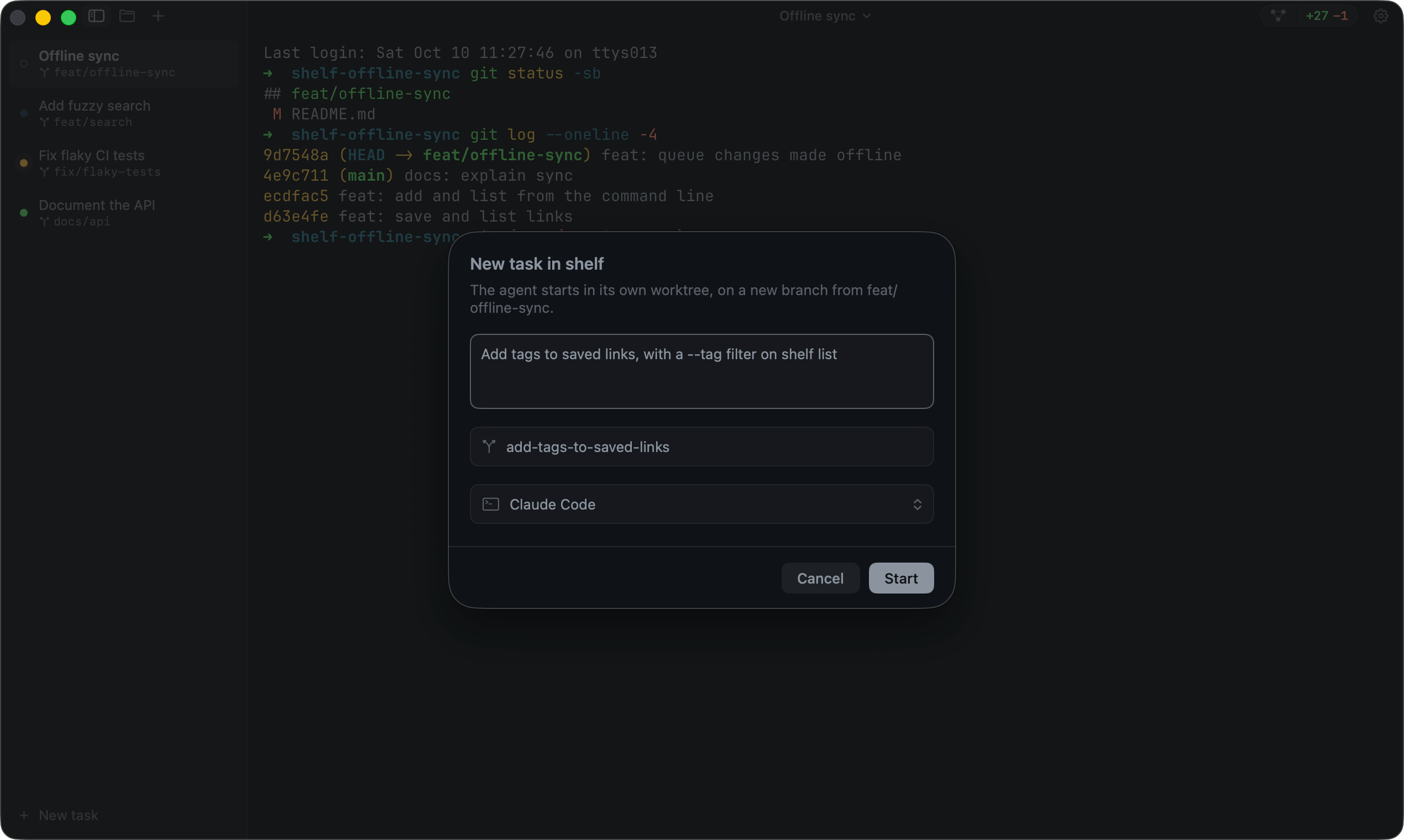
Press ⇧⌘N, describe the task, pick an agent (Claude Code, Codex, OpenCode or Pi) and a branch name. Farol fetches the remote's default branch, creates the worktree from it and starts the agent there, with your task as its first prompt. You can also start from a GitHub issue or a Jira ticket, and the agent gets the whole description.
For the files that don't come along, commit an executable .farol/setup to the repo. Farol runs it in each new worktree before the agent starts, and it can copy your ignored .env files first. A .farol/teardown runs when you remove the worktree, to stop a server or drop a database:
#!/bin/sh
set -e
npm ci
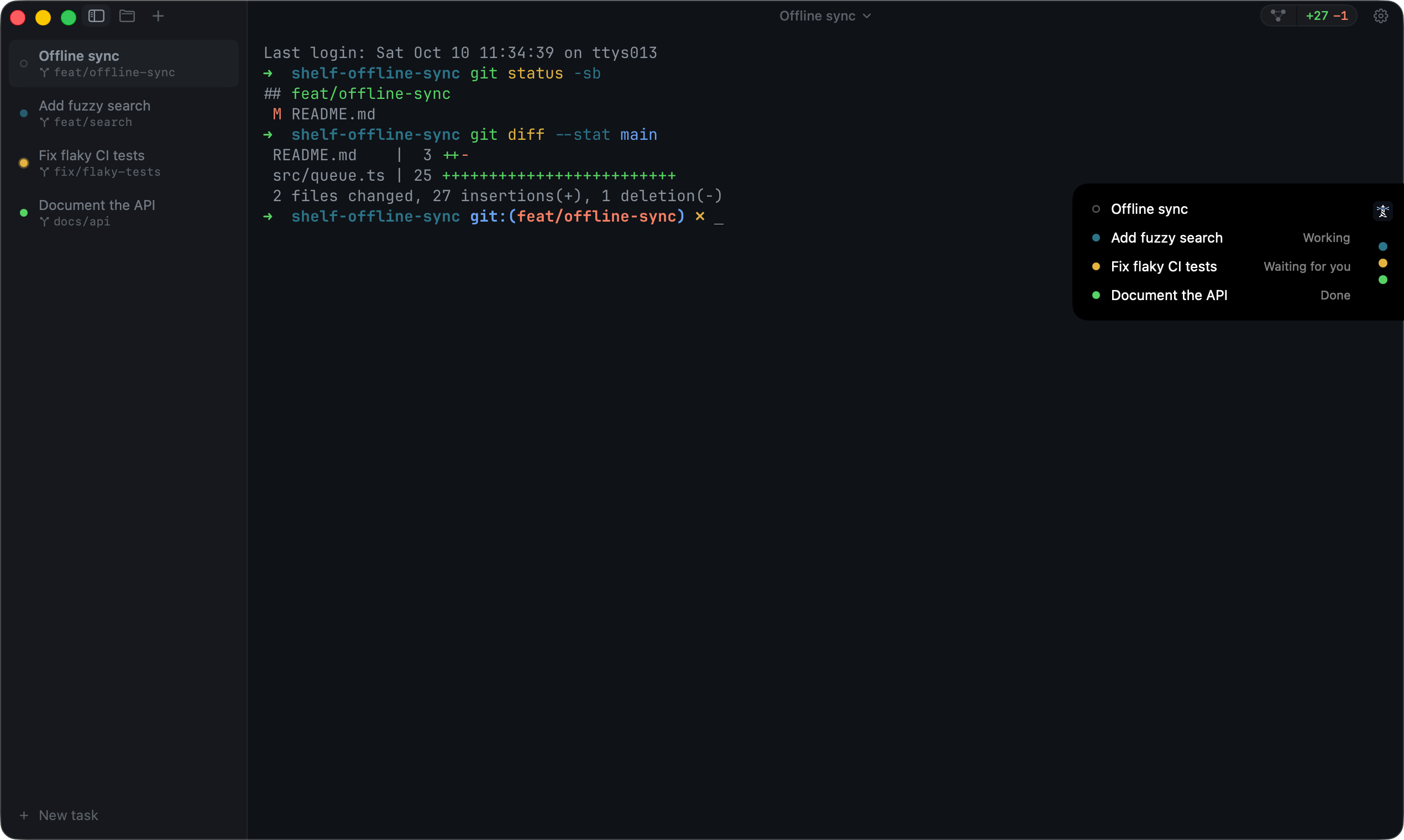
Every session has a dot in the sidebar that says working, waiting or done, with no hooks to set up. The menu bar and the notch show the same from any app. When an agent finishes, the review panel shows its whole diff. Leave a note on any line and send them all back to the agent in one message, or commit, push and open the pull request from there.
Closing the session offers to remove the worktree and always keeps the branch. A task can also span several repos, with a worktree in each on the same branch, or wait for later: once at a set time, or again on the days you pick, each run in a fresh worktree. The task docs have the details.
How many agents is too many?
For me it's three or four. The Mac handles more without trouble. What runs out is my attention, because every agent ends with a diff I have to read.
The tasks that work best in parallel are small and don't share files: a bug fix, a test for an old module, a docs update next to a feature. If two tasks need the same files, run them one after the other.
Hope this helps you get more done with your agents! If you're on a Mac and want the worktrees, status and review in one place, give Farol a try. It's free and open source. And if you're still picking a terminal, I compared the options in the best terminal for Claude Code and Codex.
Sources
Checked on November 6, 2026, and updated for Farol 0.66 on November 7. Spotted something out of date? Open an issue.